Sleep Sound Apps
The 8 best white noise apps in 2026:
free and paid, compared
Updated
Best white noise apps: quick picks
Our pick for free white noise on iPhone and Android
Veil: tune your white noise, without ads or loops
Veil gives you white noise you can shape to your ear while it plays. White noise and its sound tuning are free, along with precision volume, offline playback and a fading sleep timer. There are no ads and no account to create. The sound is generated on your phone, so there is no recorded loop restarting during the night.
- Built-in option on Apple devices: Apple Background Sounds offers free Bright, Balanced and Dark Noise, with nothing to install.
- Free mixing, if you accept ads: White Noise Lite lets you combine its recorded white noise with other sounds. Veil offers mixing and saved mixes with Premium.
Free white noise, tuned to your ear
Get Veil and make the sound your own. Adjust its character, find the right level with precision volume and set a fading sleep timer. Your white noise is generated on your phone and works offline.
Or listen to white noise in your browser firstBelow, compare eight apps on how they make white noise, what you can change, what is free, and what you pay for extras. Veil Premium is available monthly, annually or as a lifetime unlock.
Considering a physical device instead? Our white noise machine vs app guide compares Dohm, LectroFan, SNOOZ and Hatch with software on sound, controls, power and travel.
Best white noise apps at a glance
| App | Sound source | Customization | Free, and ads | To keep it | Platforms |
|---|---|---|---|---|---|
| Veil Customizable noise machine | Synthesized on the device; no prerecorded tracks restart | Sound tuning; Studio three-point frequency curve and width controls over generated noise or a library sound; saved Studio sounds and three-sound mixes (Premium) | 6 library sounds, Studio draft audition, 4 unchanged starter routines, timer and clock; no ads | $1.99/mo, $9.99/yr, or $19.99 once | iPhone, iPad, Android |
| myNoise Detailed soundscapes | Recorded scenes, varied by generators | Ten sliders per soundscape, hearing calibration, Creation Mode | A selection of soundscapes; no ads | $19.99 once on iOS (Full Access); Android and web sold separately | iPhone, iPad, Android, web |
| White Noise Lite Free mixing, community sounds | Recorded tracks, looped | Mix Pad, pitch and speed per sound, record your own | 50 sounds, with ads | Separate paid editions: Full $0.99, Pro $2.99 | iPhone, iPad, Android, Mac, Windows; paid editions add Watch and TV |
| Apple Background Sounds Built in | Built-in system sounds | Volume; equalizer and timer on iOS 26 | Everything; no ads | Free | iPhone, iPad, Mac, Vision Pro |
| Dark Noise Apple widgets and Shortcuts | Recorded tracks, looped | Custom mixes, Magic Mixes | 8 sounds, timer, Shortcuts; no ads | Pro: $2.99/mo, $19.99/yr or $49.99 once per its 2023 announcement | iPhone, iPad, Mac, Vision Pro |
| BetterSleep Sounds, stories, tracking | Recordings and music, with Smart Mix | Mixing and playlists | A limited selection | Monthly, annual and lifetime offers; check current in-app pricing | iPhone, Android |
| Calm Guided meditation and stories | Recordings and music | Playlists | A sampler | $79.99/yr after the web trial, or $499.99 lifetime; in-app offers vary | iPhone, Android, web |
| Noisli Browser work sessions | Recorded tracks, looped | Mixing, saved combos | Web: 16 sounds, 1.5 hours a day | Web Pro $10/mo billed yearly; iOS app $1.99 separately | Web, iPhone, Android |
How the apps were compared
- How the sound is made. Synthesized on the device, recorded tracks played on a loop, or recorded scenes varied by a generator. This shapes what you can change and whether you can hear a repeat.
- How much you can change it. Not the number of named sounds, but the controls each one exposes, and whether you can mix and save the result.
- What is free, and whether there are ads. What you keep without paying, not the trial.
- What it costs to keep. Subscriptions, one-time purchases, and which platform each price applies to.
- Platforms. Two of the eight are not on Android.
Everything above comes from each app's own store page, help center or website on the date in the disclosure, with links in the sources at the end. It is a comparison of published features and prices, not an overnight listening test of all eight.
The eight apps, in detail
1. Veil iPhone, iPad, Android
Veil: most customizable sleep sounds, with Studio and one-tap routines
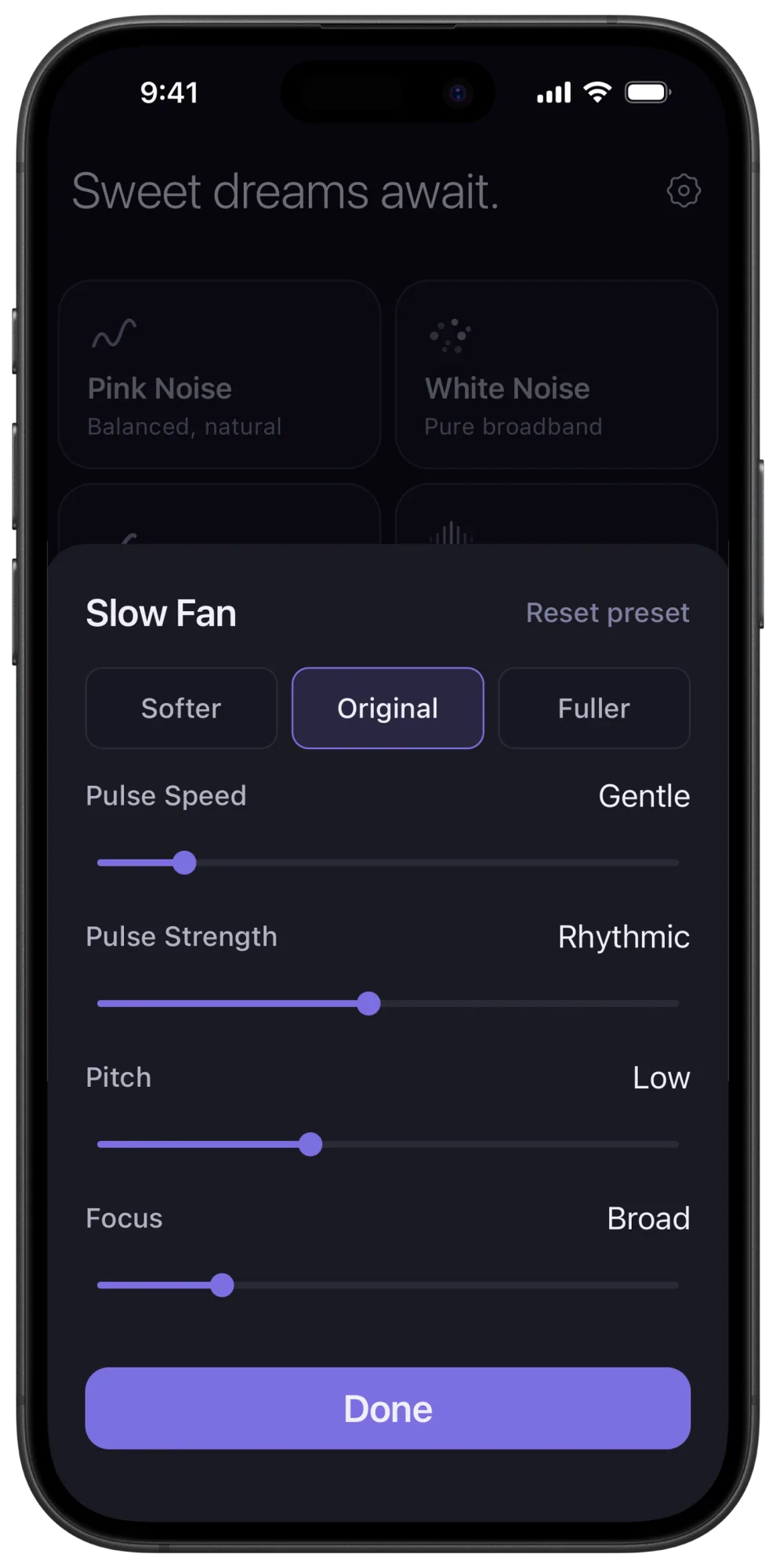
Veil combines the sound control of a noise machine with a premium modern interface. Its sounds are synthesized on your phone without prerecorded tracks restarting, and sound-specific controls let you change their character. Lower Brightness on white noise until the hiss softens, add Crispness to pink, move brown's Character toward Deep, or change a fan's Pulse Speed, Pulse Strength, Pitch and Focus until it moves the way the fan in your old bedroom did. Rain has its own controls for Density, Closeness, Patter, Puddles and Lightness.
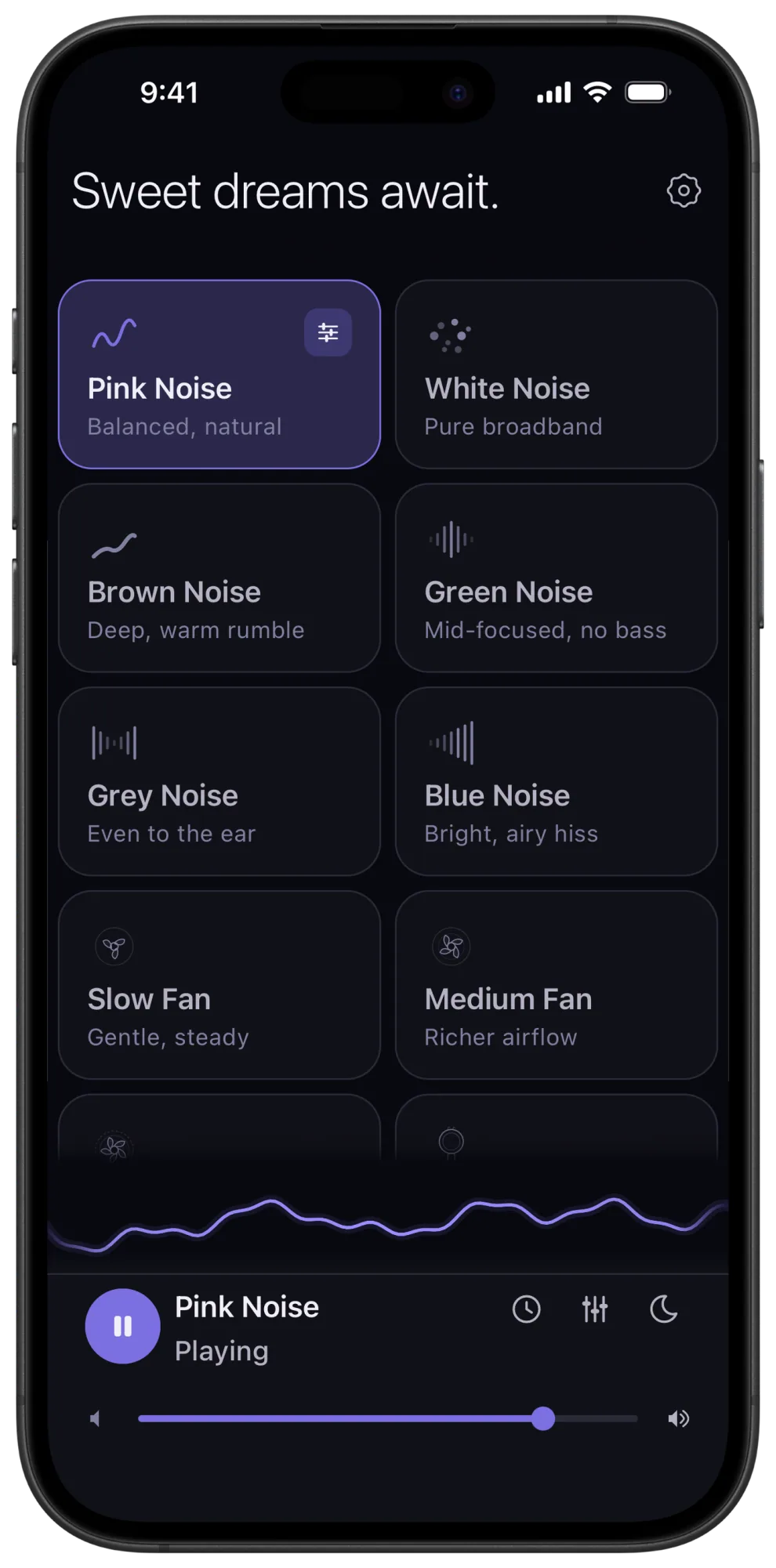
Choose from six noise colors, seven fan styles, eight mechanical sounds such as a window air conditioner, an airplane cabin and a clothes dryer, two rains, ocean waves, Thunderstorm and three continuously generated tones: 28 library sounds in all, plus Studio custom sound creation. Premium lets you layer up to three sounds, balance them and save the result for tomorrow night. Spacious sound cards, precision volume, a bedside clock and a fading sleep timer keep everyday use straightforward. Playback works offline, with no account and no ads.
Free: white, pink and brown noise, Slow Fan, Light Rain and Warm Drone, with their sound controls, the sleep timer and the bedside clock. Premium: the full collection, mixing and saved mixes, for $1.99 a month, $9.99 a year, or $19.99 once.
Before you download: mixing and saved mixes need premium. Veil focuses on adjustable noise, fans, mechanical sounds, rain, ocean waves and continuous tones; if narrated stories or guided meditations are essential to you, pair it with a content app or pick one below. You can preview the noise colors and fans and both rains and ocean waves in your browser first.
2. myNoise iPhone, iPad, Android, web
myNoise: best for detailed soundscapes and hearing calibration
More than 300 soundscapes built from field recordings and real instruments by an audio engineer, from rain and ocean to drones, chant and cathedrals. Each soundscape has ten sliders that control its frequency bands or its scene elements, the app can calibrate them to your own hearing, and Creation Mode combines sliders from different soundscapes into your own. The generators vary the recorded layers as they play rather than repeating a fixed track. No ads, and offline once a soundscape is downloaded.
Free: a selection of soundscapes. Paid: Full Access for $19.99 once on iOS; the Android app and the website are sold separately.
Before you download: the library is large and the controls are deep. If you want recorded environments and scene-level control, this is the one. Full comparison: Veil vs myNoise.
3. White Noise Lite iPhone, iPad, Android, Mac, Windows
White Noise Lite: best for free mixing and community recordings
TMSOFT's White Noise has been on the App Store since 2008, and Lite is its free, ad-supported edition: 50 recorded sounds, a Mix Pad for layering them, a recorder for your own, alarms with fade-in, a full-screen clock, a sleep log, and a companion Market with more than 50,000 community-uploaded sounds. The stock sounds are recordings played on a seamless loop.
Free: all 50 sounds and the mixer, with ads. Paid editions, sold separately: White Noise for $0.99 removes the ads; White Noise Pro for $2.99 adds HD sounds. Lite itself is free on iPhone, Android, Mac and Windows; TMSOFT's edition table assigns Apple Watch, Apple TV, Android TV and generator tools to the paid editions.
Before you download: Lite has ads, and the free sounds are stock recordings; the customization is mixing and pitch rather than reshaping a sound. If free layering and recording your own sounds matter most, it is the best free option on Android. Full comparison: Veil vs White Noise Lite.
4. Apple Background Sounds iPhone, iPad, Mac, Vision Pro
Apple Background Sounds: best built-in option for Apple devices
Built into iOS since version 15, and reachable from Control Center with a tap and hold. Balanced, bright and dark noise plus ocean, rain and stream, with more sounds, a stop timer and an equalizer (a balance slider and a tone grid with Broad and Focused presets) added in iOS 26. It plays underneath music and podcasts at its own level and costs nothing.
Free: everything, no ads. The equalizer and timer need iOS 26, iPadOS 26, visionOS 26 or macOS Tahoe.
Before you use it: three noise flavors and no fan, no mixing, and no Android. If basic playback covers you, start here; Veil adds a dedicated interface, adjustable fans and mechanical sounds, precision volume, and optional mixing with saved mixes.
5. Dark Noise iPhone, iPad, Mac, Vision Pro
Dark Noise: best for Apple widgets and automation
Fifty-plus recorded sounds with animated icons, custom mixes, Siri Shortcuts, Lock Screen and Home Screen widgets, a fade-out timer, and Magic Mixes that build a soundscape from a typed prompt. It is the most tightly integrated with iOS of anything on this list: if you automate your bedtime with Shortcuts or want a sound machine on your Lock Screen, this is the fit.
Free: eight sounds with the timer, Shortcuts and widgets; no ads. Paid: Dark Noise Pro at $2.99 a month, $19.99 a year or $49.99 once, per the 2023 announcement; the current App Store listing shows those amounts without billing periods. Pro unlocks the full library, custom mixes, icons and themes.
Before you download: no Android. The sounds are recordings played on a loop, and the lifetime price is $49.99. Its App Store listing shows version 3.6, released in September 2026, on the check date.
6. BetterSleep iPhone, Android
BetterSleep: best for sounds, stories and sleep tracking together
More than 300 sounds and music tracks, more than 250 meditations and hypnosis sessions, more than 100 sleep stories, a sleep tracker and a snore recorder, all in one app. Sounds can be layered into mixes and playlists, and a Smart Mix feature is designed to reduce noticeable repeats. It holds an App Store Editors' Choice.
Free: a limited selection. Paid: monthly and annual subscriptions, or lifetime access. Its help center says prices vary by offer, platform and currency; the public listing does not identify billing periods for each amount.
Before you download: the noise part is one section of a much broader product. If all you want is a noise machine, you would be paying for the stories, meditations and tracking too.
7. Calm iPhone, Android, web
Calm: best for guided meditation and narrated sleep stories
The best-known app on the list. Sleep stories read by well-known voices, guided meditations, music, and a set of soundscapes: ocean, heavy rain, campfire and the rest. Calm is a meditation and sleep-story product first; the soundscapes are there to fall asleep to after the story ends.
Free: a sampler. Paid: a web trial that renews at $79.99 a year, or $499.99 lifetime access, per Calm's help center; in-app offers vary.
Before you download: white noise is a side dish here. Pick it for the guided content, not for noise.
8. Noisli Web, iPhone, Android
Noisli: best for browser-based work sessions
Sounds you mix on a clean grid, with a timer, saved combos and a focus workflow. It is web-first: the free plan is 16 sounds for 1.5 hours a day in the browser, and Pro is $10 a month billed yearly with 28 sounds. The iPhone and Android apps are separate products with offline playback; the iPhone app is $1.99 once.
Free: the web plan, 16 sounds, 1.5 hours a day. Paid: web Pro at $10 a month billed yearly; the iOS app at $1.99, separately.
Before you use it: the free web plan's daily cap suits a work session, not a night. The iPhone app's App Store listing showed a last update in 2017 on the check date.
Create your own sound in Studio. Veil is our pick for the most customizable sleep sound app: tune the library sounds, then go further with Studio custom sound creation. Start with generated noise or a tuned library sound, then shape a three-point frequency curve and adjust its width. Creating and auditioning a Studio draft is free. Premium lets you save, replay and refine up to six Studio sounds, and combine saved Studio sounds with library sounds in mixes of up to three.
Return to your setup with one tap. One-tap routines bring back your sounds, levels, timer and fade together. The unchanged Focus, Nap, Sleep and Meditate starters play free. Premium lets you save and play custom or edited routines, including routines that use saved Studio sounds.
How customizable are the sounds?
A list of sound names only tells you where you can start. What matters next is how closely you can adjust the result to your ears and your room.
Veil gives you library sound tuning and Studio custom creation in one place. Turn a fan from a soft, steady hum into a broader, pulsing wash by adjusting its Pulse Strength and Focus. Make brown noise deeper, or smooth the edge off pink noise by lowering its Crispness. Adjust rain from a distant patter to a fuller downpour with the Density and Closeness controls. Mechanical sounds have their own Rhythm Speed, Rhythm Strength, tone and motor controls. With premium mixing and independent levels, those starting points open into virtually limitless variations for your room and your ears.
Other apps offer customization too, and it is worth comparing the actual controls. myNoise gives each soundscape ten sliders over its frequency bands or scene elements, and can calibrate them to your hearing. White Noise Lite mixes sounds and changes their pitch and speed. Apple's Background Sounds gained an equalizer in iOS 26. Veil's difference is that the shaping reaches inside the synthesis, so a fan's movement or a rain's texture changes, not just its balance, and it lives in a modern noise-machine interface that keeps bedtime simple.
Synthesized sound and repeating recordings
Veil creates its audio on your device. There are no prerecorded tracks or sound packs to download, playback is designed so you never hear a loop, and you can shape the sound while you listen and keep it playing offline.
Recorded sound is a different approach. A player can repeat a track and blend its ending into its beginning, or combine and vary several recorded layers, as myNoise and BetterSleep's Smart Mix do. These methods can sound continuous too. If repeating patterns bother you at 3am, listen to the sound you plan to use for a while, not just a count of the tracks in an app. Veil's browser previews let you do that before installing anything.
Free white noise apps without ads
Several of the eight give you something useful free, without ads. Veil's six-sound free tier includes white, pink and brown noise, Slow Fan, Light Rain and Warm Drone, each with its sound controls, plus the sleep timer and bedside clock, on iPhone and Android. Apple Background Sounds is free on any recent Apple device. myNoise has a free selection of soundscapes. White Noise Lite's free tier is larger but ad-supported, and Dark Noise's eight free sounds are for Apple devices only.
Which white noise app should you pick?
- A modern, adjustable noise machine for nightly use, on iPhone or Android: Veil. Synthesized sound without recorded tracks restarting, per-sound shaping, precision volume, free without ads, and a $19.99 lifetime unlock.
- Recorded environments, scene-level control and hearing calibration: myNoise.
- Free mixing, recording your own sounds, or an alarm clock in the same app: White Noise Lite, with ads, or its $0.99 and $2.99 paid editions.
- Nothing to install on an iPhone: Apple Background Sounds.
- Shortcuts, widgets and Apple automation: Dark Noise.
- Sounds plus meditations, stories and sleep tracking: BetterSleep, or Calm if the narrated stories and voices matter most.
- Working with noise at a desk: Noisli's web player.
Your sound, shaped to your ear
Start free with six library sounds, Studio draft creation and audition, four unchanged starter routines, precision volume and a fading sleep timer. No ads, no account. Premium unlocks all 28 library sounds, saving, replaying and refining up to six Studio sounds, three-sound mixing, saved mixes and custom routines: subscribe if you want, or pay $19.99 once.
Or preview Veil's sounds in your browser firstFrequently asked questions
What is the best free white noise app without ads?
Veil, if you want customizable white, pink or brown noise or a fan on iPhone or Android without ads. Its free sounds include their tone controls, the sleep timer and the bedside clock. Apple Background Sounds is a built-in alternative on recent Apple devices, and myNoise has a free selection of soundscapes.
Which white noise app does not loop?
Veil synthesizes its sounds on your device, with no prerecorded tracks, and its playback is designed so you never hear a loop. myNoise takes another approach, varying the recorded layers within each soundscape as it plays. A seamlessly looped recording can hide its join, but you may still recognize recurring details over a night.
Which white noise app is best for Android?
Veil is the pick for a modern, ad-free noise machine with extensive sound controls and an optional $19.99 lifetime unlock. Consider myNoise for detailed scene controls and recorded environments, or White Noise Lite for free mixing and community recordings with ads. Dark Noise and Apple Background Sounds are not available on Android.
Can I pay once instead of subscribing?
Yes, with several of these. Veil offers lifetime premium for $19.99. myNoise sells a $19.99 Full Access unlock on iOS. TMSOFT sells separate paid editions at $0.99 and $2.99. Dark Noise has a $49.99 lifetime option. Calm sells lifetime access for $499.99 on its website, and Noisli's iOS app is a $1.99 purchase separate from its web plans. Check each platform's current offer.
Do I need a separate white noise app on iPhone?
Not always. Apple Background Sounds covers basic noise, rain and ocean playback, and iOS 26 adds an equalizer and a stop timer. Veil adds a dedicated interface, adjustable fans and mechanical sounds, per-sound shaping, precision volume, and optional mixing with saved mixes.
Sources
Prices, free tiers and platforms were read from each app's own store page, help center or website on October 11, 2026. Prices are US figures, vary by storefront and change; the app's page is the source of record.
- Veil: White Noise Sleep Sounds, App Store
- myNoise: The Soundscape App, App Store and myNoise FAQ
- White Noise by TMSOFT, product and edition table and White Noise Lite, App Store
- Use Background Sounds to help with sleep, focus, and more, Apple Support
- Dark Noise: Ambient Sounds, App Store and darknoise.app
- BetterSleep: Relax and Sleep, App Store and BetterSleep pricing help
- Calm, App Store and Calm Lifetime Membership FAQ and Calm web trial pricing
- Noisli pricing and Noisli, App Store